
Enable SecureBoot support
Preamble/Introduction
Section titled “Preamble/Introduction”Garuda Linux provides optional SecureBoot support for either compatibility reasons or increased security.
The following list will explain when SecureBoot support is useful/necessary:
-
If a potential increase in security is desired.
-
Another operating system or software on another operating system requires SecureBoot (prime use-case).
- An alternative is to toggle SecureBoot whenever using this software (not desirable).
For any other use case, we recommend leaving SecureBoot disabled. SecureBoot support cannot be enabled on legacy/BIOS systems. Only UEFI is supported.
-
Installing SecureBoot support
Install
garuda-secureboot:Terminal window sudo pacman -S garuda-securebootInstall SecureBoot support:
Terminal window sudo garuda-secureboot --installExpected output:
:: Creating signing keys...:: Asking Garuda tooling to reinstall and sign GRUB...:: Asking Garuda tooling to reinstall and sign kernels...:: Installing shim bootloader...:: Updating UEFI boot entries...:: SecureBoot support has been enabled. Reboot, enable secureboot in the system firmware settings and complete the MOK enrollment to finalize the process. -
Configuring Shim
-
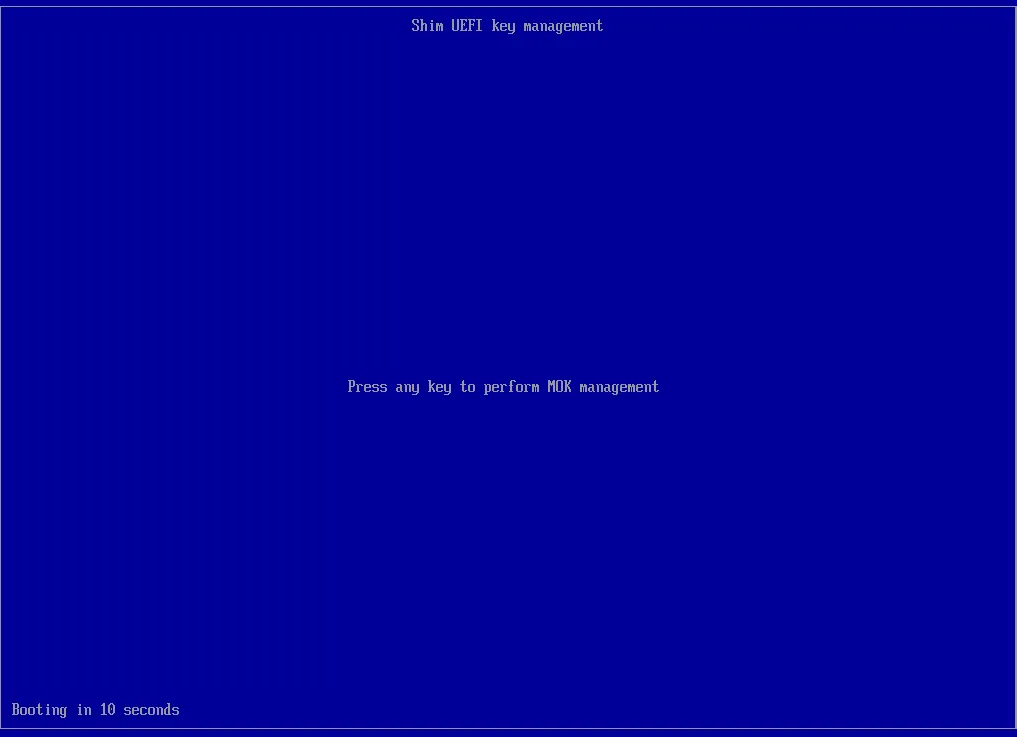
Reboot the system and press any key when seeing this screen:
-
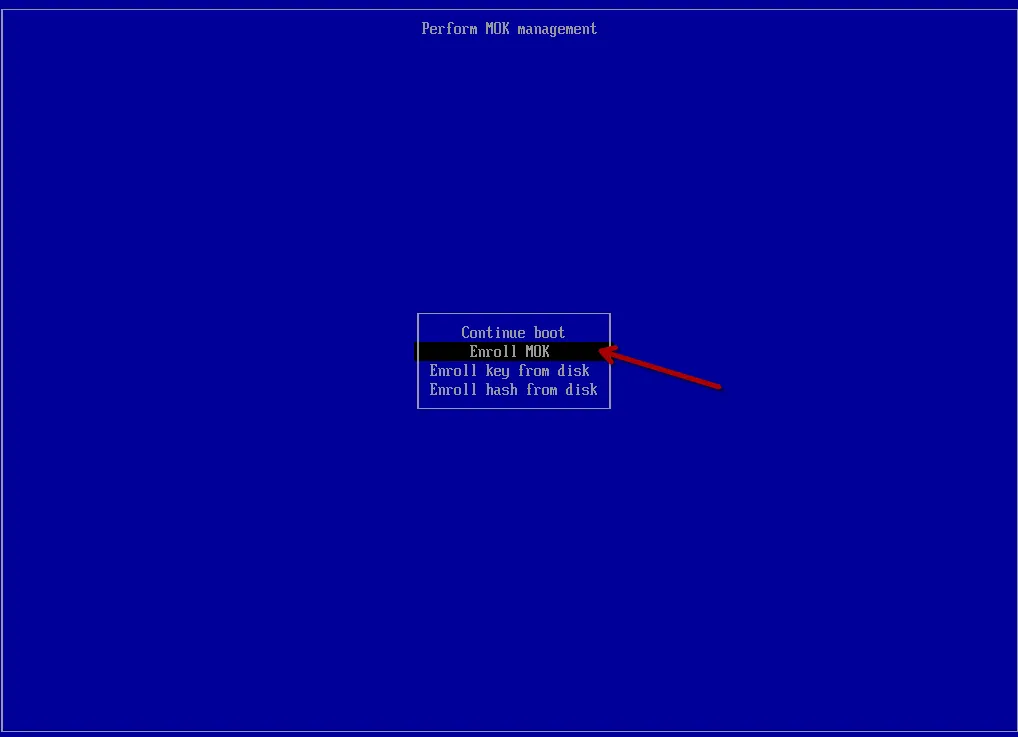
Select “Enroll MOK”:
-
Select “Continue”
-
Select “Yes”
-
Enter the password
garuda(all lowercase). The password will be invisible in the password box. PressEnterEnter when done. -
Select “Reboot”.
-
-
Enabling SecureBoot
Boot into BIOS/UEFI Setup and enable SecureBoot. It may be necessary to “reset the keys” to default to exit “Setup mode”. Upon rebooting the system, SecureBoot should be enabled:
Terminal window $ sudo garuda-securebootSecureBoot support is active.SecureBoot is enabled.
Maintenance
Section titled “Maintenance”The “Garuda” bootloader is the only bootloader that will be automatically managed for SecureBoot support: Why should the “Garuda” bootloader be used?.
Linux kernels will be automatically signed when installed via garuda-dracut-support. The command dracut-rebuild can be used to manually reinstall the kernels if necessary.
The GRUB bootloader will be automatically signed when installed via garuda-hooks. If needed, reinstalling GRUB can be done via sudo pacman -S grub, which will trigger the pacman hook for automatic GRUB updates.
Secureboot keys/certificates can be found at /var/lib/garuda/secureboot/keys/ if manual signing is necessary.
Uninstalling
Section titled “Uninstalling”Before continuing, disable SecureBoot in the BIOS/UEFI Setup.
Remove SecureBoot support:
sudo garuda-secureboot --uninstallExpected output:
:: Updating UEFI boot entries...:: Uninstalling shim bootloader...:: Asking Garuda tooling to reinstall GRUB...:: Asking Garuda tooling to reinstall kernels...:: Removing signing keys...:: SecureBoot support has been disabled.