
Partial upgrades
What is a partial upgrade?
Section titled “What is a partial upgrade?”A “partial upgrade” is an unsupported operation that happens when only a part of your system has been updated. This can lead to major issues when applications are not built to support older or newer versions of related software.
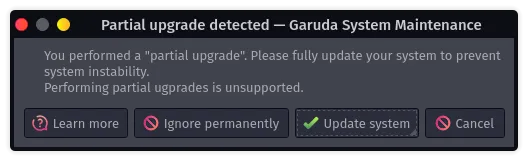
Problems can range from applications not opening to a broken system, depending on the severity. Garuda Linux ships Garuda system maintenance, which can detect and notify about partial upgrade situations automatically.

What can cause a partial upgrade?
Section titled “What can cause a partial upgrade?”Partial upgrades happen whenever the “sync” database is updated without applying any system updates. Then, when a package is installed from the repositories, the system is considered “partially upgraded”, because that package may not be intended to be used with your already installed packages.
Partial upgrades happen if you do the following:
pacman -Sy [package name]pacman -Syfollowed bypacman -S [package name]at a later timepacman -Syuif not completed successfully (even answering no!), followed bypacman -S [package name]at a later time
What is the solution?
Section titled “What is the solution?”To return a partially upgraded system back to a consistent state, a full system update needs to be performed.
Via CLI
Section titled “Via CLI”The Garuda Linux developers recommend using the update command in your terminal of choice to apply system updates.
Via GUI
Section titled “Via GUI”- Search and start Garuda Toolbox using the start menu
- Open Maintenance and select “Update system”, then enter your password as requested
- Let the pre-update steps complete and then confirm you want to apply the update
- Wait for the update to finish