
FSR4
Since MESA 25.2, it is possible to run on Linux FSR4 in games that support either FSR3.1 or FSR4. The driver functionality allows us to upgrade FSR3.1 based games to FSR4, or just use FSR4 native games.
- The easiest way to have FSR4 working on RDNA2 is to use
proton-cachyosorproton-ge. - The easiest way to have FSR4 working on RDNA3 is to use the latest Valve
Proton Experimentalorproton-cachyosorproton-ge. - The easiest way to have FSR4 working on RDNA4 is to use
proton-cachyosorproton-ge.
Following conditions are needed in order to use FSR4:
- Latest MESA drivers, at minimum
25.2 - FSR4 capable GPU
- Latest:
proton-cachyos> RDNA4 & RDNA3 & RDNA2proton-ge> RDNA4 & RDNA3 & RDNA2Proton Experimental> RDNA3 only
How to enable FSR4
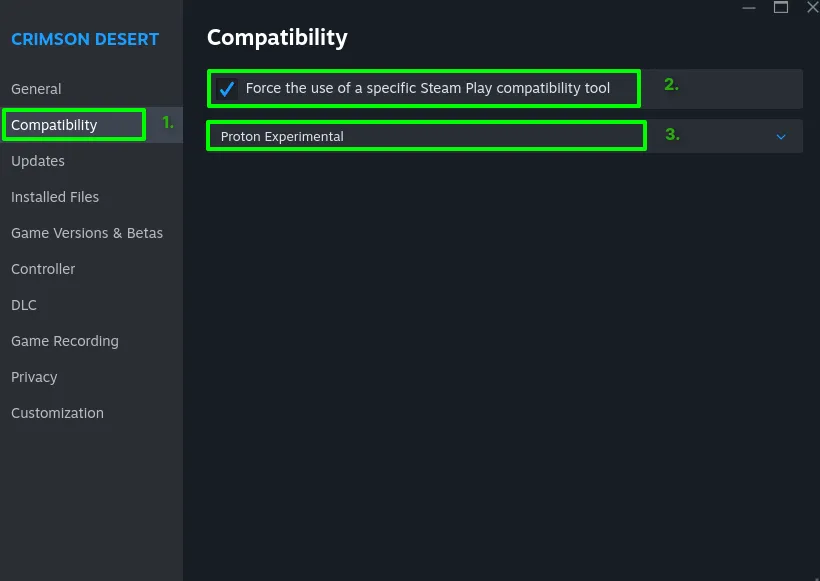
Section titled “How to enable FSR4”Force compatibility to Proton Experimental. No launch command is needed.
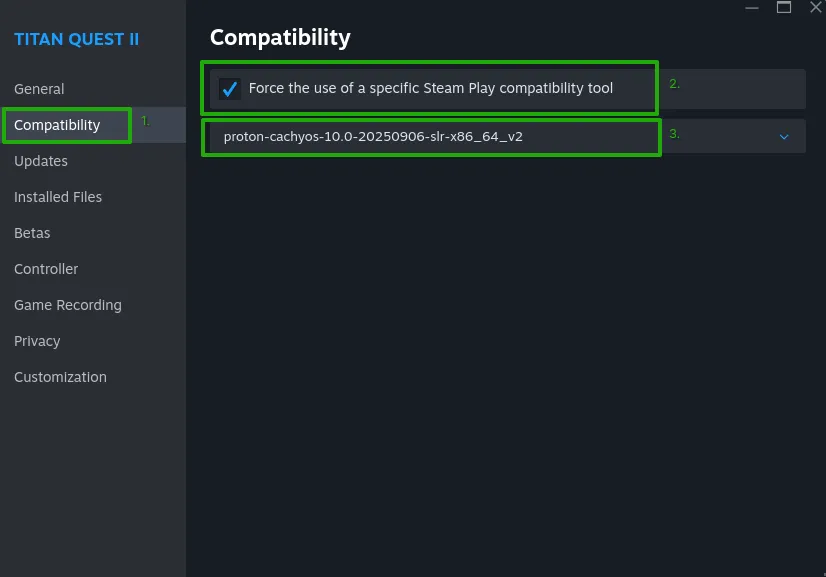
Force compatibility to Custom Proton.
To turn on FSR4 is as easy, as forcing Compatibility in Steam by choosing proton-cachyos or proton-ge latest versions.
Enable FSR4 on discrete RDNA4 (90X0 GPUs)
Section titled “Enable FSR4 on discrete RDNA4 (90X0 GPUs)”Custom Proton
Section titled “Custom Proton”- Force one of the two custom proton versions
- Add to the game’s Launch Options in Steam:
PROTON_FSR4_UPGRADE=1enables FSR4 and auto-upgrades FSR3.1 to FSR4FSR4_WATERMARK=1shows a watermark in case FSR4 is properly running, it can be disabled by setting 0 or by removing the commandPROTON_FSR4_INDICATOR=1shows a watermark in case FSR4 is properly running, it can be disabled by setting 0 or by removing the command
PROTON_FSR4_UPGRADE=1 launch command is not needed.
Since release 11.0-20260702 FSR4 is automatically enabled and upgraded to the latest available version.
PROTON_FSR4_UPGRADE=1 launch command is not needed.
Since release 11-2 FSR4 is automatically enabled and upgraded to the latest available version.
Enable FSR4 on discrete RDNA3 (7X00 GPUs)
Section titled “Enable FSR4 on discrete RDNA3 (7X00 GPUs)”Proton Experimental
Section titled “Proton Experimental”AMD and Valve now officially support FSR4.X for Linux for the RDNA3 based GPUs. So every 7000 series user can now use the FSR4 without any workaround using the latest Proton Experimental from Valve.
This does 2 things:
- Enables full FSR4 4.1 support for RDNA3
- Upgrades any FSR3.1 to FSR4 4.1
It should work automatically without any special arguments or launch commands.
Custom Proton
Section titled “Custom Proton”- Force one of the two custom proton versions
- Add to the game’s Launch Options in Steam:
PROTON_FSR4_RDNA3_UPGRADE=1enables FSR4 and auto-upgrades FSR3.1 to FSR4FSR4_WATERMARK=1shows a watermark in case FSR4 is properly running, it can be disabled by setting 0 or by removing the commandPROTON_FSR4_INDICATOR=1shows a watermark in case FSR4 is properly running, it can be disabled by setting 0 or by removing the command
PROTON_FSR4_RDNA3_UPGRADE=1 launch command is not needed.
Since release 11.0-20260702 FSR4 is automatically enabled and upgraded to the latest available version.
PROTON_FSR4_RDNA3_UPGRADE=1 launch command is not needed.
Since release 11-2 FSR4 is automatically enabled and upgraded to the latest available version.
Enable FSR4 on discrete RDNA2 (6XX0 GPUs)
Section titled “Enable FSR4 on discrete RDNA2 (6XX0 GPUs)”Custom Proton
Section titled “Custom Proton”- Force one of the two custom proton versions
- Add to the game’s Launch Options in Steam:
PROTON_FSR4_UPGRADE=1enables FSR4 and auto-upgrades FSR3.1 to FSR4FSR4_WATERMARK=1shows a watermark in case FSR4 is properly running, it can be disabled by setting 0 or by removing the commandPROTON_FSR4_INDICATOR=1shows a watermark in case FSR4 is properly running, it can be disabled by setting 0 or by removing the command
No launch command is needed.
Since release 11.0-20260702 FSR4 is automatically enabled and upgraded to the latest available version.
No launch command is needed.
Since release 11-2 FSR4 is automatically enabled and upgraded to the latest available version.
Examples of FSR4 vs FSR3
Section titled “Examples of FSR4 vs FSR3”If FSR4 is running properly you should see:
- The watermark/indicator (works only with custom proton)
- The visual difference should be visible immediately
Watermark

Comparison of the visual quality
FSR3.1


FSR4


FSR4 versions (proton-cachyos)
Section titled “FSR4 versions (proton-cachyos)”FSR4 MLFG - Redstone FG (Custom Proton)
Section titled “FSR4 MLFG - Redstone FG (Custom Proton)”When running FSR4 we have the possibility to use the latest variation of AMD FG called Redstone FG. By default FSR4 uses FG 3.1, Redstone FG provides better visual quality.
Custom Proton
Section titled “Custom Proton”- Force
proton-cachyosorproton-ge. - Add to the game’s Launch Options in Steam:
MLFG_UPGRADE=1enables in FSR4 Redstone FGDXIL_SPIRV_CONFIG=wmma_rdna3_workaroundneeded for RDNA3 GPUsFSR4_WATERMARK=1shows a watermark in case FSR4 is properly running, it can be disabled by setting 0 or by removing the commandPROTON_FSR4_INDICATOR=1shows a watermark in case FSR4 is properly running, it can be disabled by setting 0 or by removing the command
MLFG_UPGRADE=1 %command%MLFG_UPGRADE=1 DXIL_SPIRV_CONFIG=wmma_rdna3_workaround %command%MLFG_UPGRADE=1 %command%