
Release Notes and Migration
NEW SPIN (as of 2025-03-07)
Section titled “NEW SPIN (as of 2025-03-07)”Welcome to Garuda Mokka! Catppuccin flavor deeply integrated into Arch Linux alongside Garuda’s feature-full packages.
THE GOAL
Section titled “THE GOAL”Garuda has many spins with striking colors and KDE-based ones are pushing this quite far. We wanted to offer a KDE spin that would be virtually the exact opposite of Dr460nized. Dr460nized is a positively aggressive and very awake spin, now you have one very muted, relaxing and zen.
WHICH COLOR PALETTE
Section titled “WHICH COLOR PALETTE”With such different color mixes, we opted only for 1 customized Catppuccin-Mocha-Mauve flavor out of the box. See the palette for colors used.
The reason for this is there are so many possible combos it would have been too much work to offer (and maintain) them all, would have taken more ISO and installed system space and a lot of Global Themes to choose from, which could be confusing or too much for people.
This brings to the point: Why Catppuccin? Because not only it is Community-based, it has lots of flavors to choose from, is very popular everywhere and in Feb 2025 had 394 ports! Mixing this with Garuda became a must. Therefore, some Garuda websites and its Forum also offer Catppuccin colors!
What do we include with this spin?
The basic Garuda tools packages (all non-gamers) you find in Dr460nized are also offered in Mokka. That’s the foundation.
Firedragon
Section titled “Firedragon”Then our famous Firedragon browser totally did not fit! This is why we are offering a new skinned version: firedragon-catppuccin. It uses a theme that matches the one we chose for Mokka, even the icon and logos have been re-worked. It packages, in place or on top of standard Firedragon, the following:
- Catppuccin Floorp-oriented theme
- Styl-us extension, for those wanting to view over 110 popular websites in Catppuccin colors. The extension is ready to receive Catppuccin userstyles.
Plasma themes
Section titled “Plasma themes”For Plasma 6.3.1 we packaged the following themes:
-
KDE Global Theme
-
GTK GTK Theme
-
Micro terminal editor
-
Conky manager
-
Fish shell
-
Konsole terminal
-
Google Inter fonts for the system and JetBrains Mono Nerd for terminal
-
Tela Circle Dracula icons theme
-
Custom Plasma Style based on Utterly-Round
-
Slightly customized SDDM6 Log in screen based on Magna from l4k1
-
New Wallpapers fitting dark Catppuccin palette
-
3 Panel-Colorizer presets
- 2 on the Top Panel (more on that below)
- 1 on the bottom Dock
Two of them together are bringing back the fully transparent look we used to have with Latte-Dock. The third one, for the Top Panel, is when a window touches the panel or is maximized, then a special panel theme (preset) activates (built-in “Mokka Carbon”) for 2 reasons:
- A maximized window with a transparent panel does not look good, it requires more opacity
- Notify people at least 1 window is touching the panel or is maximized
MIGRATION FROM OTHER GLOBAL THEME
Section titled “MIGRATION FROM OTHER GLOBAL THEME”If you don’t want to install from the ISO but would like to migrate to the full Garuda Mokka theme, here are the steps to follow coming from a non-customized Dr460nized installation
Packages and Global Theme
Section titled “Packages and Global Theme”-
Backup your current installation your preferred way
-
Fully update your system (done in Terminal). Skipping this step may have huge consequences
Terminal window garuda-update -
Install garuda-mokka + firedragon-catppuccin and accept removal of all suggested packages
Terminal window sudo pacman -S garuda-mokka firedragon-catppuccin -
Do not logout nor reboot/shutdown and keep a Terminal window open
-
In System Settings Global Theme - apply both Appearance settings and Desktop and window layout of Mokka theme.
-
Reboot
During the reboot process, you should already have the new GRUB theme, SDDM theme, Plasma settings and Wallpaper.
Settings in your home folder
Section titled “Settings in your home folder”However everything else requires manual intervention because they affect files in your $HOME folder.
-
Open Kvantum Manager,
Changethe theme for Mokka andUse This Theme -
Go back in System Settings
- Text & Fonts - change the font for
Inter, exceptLiberation Monofor fixed width - Window Management - Desktop Effects, make sure
Bluris disabled andBetterBluris enabled, then openRounded Cornerssettings, go inOutlinestab and change the settings for the following (including the Outline transparency that you barely see the super small indicator for!):
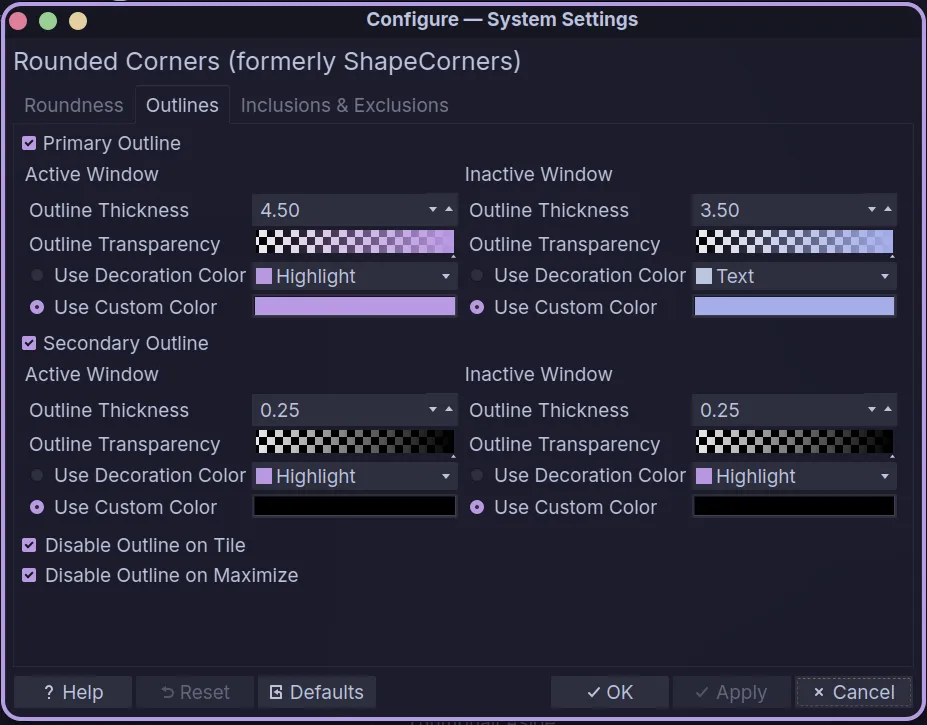
Normally you should use Highlight and ToolTip Text or Text for the Decoration Colors. The Custom colors are #cba6f7 (Mauve) and #b4befe (Lavender).
Rounded-Cornersis not visible?- Watch if your list excludes unsupported effects
- If it doesn’t, then install it:
Terminal window sudo pacman -S kwin-effect-rounded-corners-git - Text & Fonts - change the font for
-
For KDE Syntax Highlighting, open your text editor (for example Kate) and change the Editor Color Theme (in Kate it’s called like that, if you don’t have it then Settings>Configure Kate>Color Themes>Default Theme>Select Theme = Mokka) for
Mokka -
For Konsole, edit
~/.local/share/konsole/Garuda.profileand replace ColorScheme and Font lines with~/.local/share/konsole/Garuda.profile ColorScheme=MokkaFont=JetBrainsMono Nerd Font,12,-1,5,700,0,0,0,0,0,0,0,0,0,0,1,Bold -
For Fish theme, copy
/etc/skel/.config/fish/themes/Catppuccin\ Mocha.themeto~/.config/fish/themes/. Create the folder if it doesn’t existIn terminal, execute
Terminal window yes | fish_config theme save "Catppuccin Mocha" -
For Starship, copy
/etc/skel/.config/starship-mokka.tomlto~/.config/starship.toml -
For Fastfetch
If you are using your own version, go in your config file located in
~/.config/fastfetch/, edit the source line at the beginning where it fetches a PNG and change it for/usr/share/icons/garuda/mokka-fastfetch.png.If you are using the standard preset, change the last line in
~/.config/fish/config.fishwhere it loads a config for~/.config/fish/config.fish fastfetch --config mokka.jsonc -
For
Micro, copy/etc/skel/.config/micro/colorschemes/catppuccin-mocha.microto~/.config/micro/colorschemes/. Create the folder if it doesn’t existChange the colorscheme line in
~/.config/micro/settings.jsonforcatppuccin-mocha -
For bat theme, create folder
~/.config/bat/themesand copy the files/etc/skel/.config/bat/configin~/.config/bat/and/etc/skel/.config/bat/themes/Catppuccin\ Mocha.tmThemeto~/.config/bat/themes/In terminal, execute
Terminal window bat cache --build -
For Screen Locker wallpaper, if it did not apply, edit
~/.config/kscreenlockerrcand replace the Greeter and Greeter/Wallpaper/General sections with the following:~/.config/kscreenlockerrc [Greeter]Theme=MokkaWallpaperPlugin=org.kde.image[Greeter][Wallpaper][org.kde.image][General]Image=/usr/share/sddm/themes/Mokka/background.png
Fixing the no SDDM theme issue
Section titled “Fixing the no SDDM theme issue”This situation might occur when your SDDM configuration files do not follow the current standard, mainly in the location of the files or in which one you set the theme. Possible if you have an old installation things have moved around with recent Plasma versions.
No matter the reason, you need to find the .conf file that has a THEME section.
- Could be in
/etc/sddm.conf.d/sddm.conf - Could be in
/etc/sddm.conf.d/kde_settings.conf - Could be in
/usr/lib/sddm/sddm.conf.d/default.conf - Could be somewhere else or you might need to create
/etc/sddm.conf.d/sddm.conf.
It is difficult to understand exactly which file is picked-up by any possible system depending on when back in time the system was installed. Once you find that file, go in the Themes section, find the lines with the theme name and cursor theme and change them for
Current=MokkaCursorTheme=Catppuccin-Mocha-MauveGTK THEME
Section titled “GTK THEME”It is possible your GTK theme does not display the proper theme (almost 100% certain!). To use the proper theme, perform the following:
Verify if you have a theme set in GTK_THEME variable
env | grep GTK_THEMEIf it returns nothing (normal case):
- Go in System Settings, Application Styles, then Configure GNOME/GTK Application Style in top right or click the 3 vertical dots followed by Configure GNOME/GTK and change the theme for
Catppuccin-Purple-Dark-Catppuccin.
If it returns something (unusual case), you have to unset (make sure you won’t impact something else on your machine, that is up to you to validate first):
unset GTK_THEME # in bash shellset -e GTK_THEME # in fish shell- Then go in System Settings, Application Styles, then Configure GNOME/GTK Application Style in top right or click the 3 vertical dots followed by Configure GNOME/GTK and change the theme for
Catppuccin-Purple-Dark-Catppuccin.