Skip to content

Mokka Version 2.0

This wiki article provides insight into the migration of Mokka Theme to version 2.0.

What are the major differences with version 1?

Section titled “What are the major differences with version 1?”

Redesigned theme

A redesign of the Theme in terms of Color Scheme and Rounded Corners. These changes are to make the theme even smoother and more blended with less color changes within applications. Some say it tries to mimic GNOME in certain ways, which isn’t wrong, although it was not the intention.

MokkaKitty

There is also the addition of a second Global Theme, called MokkaKitty, which uses more of the Breeze style for those who like that one.

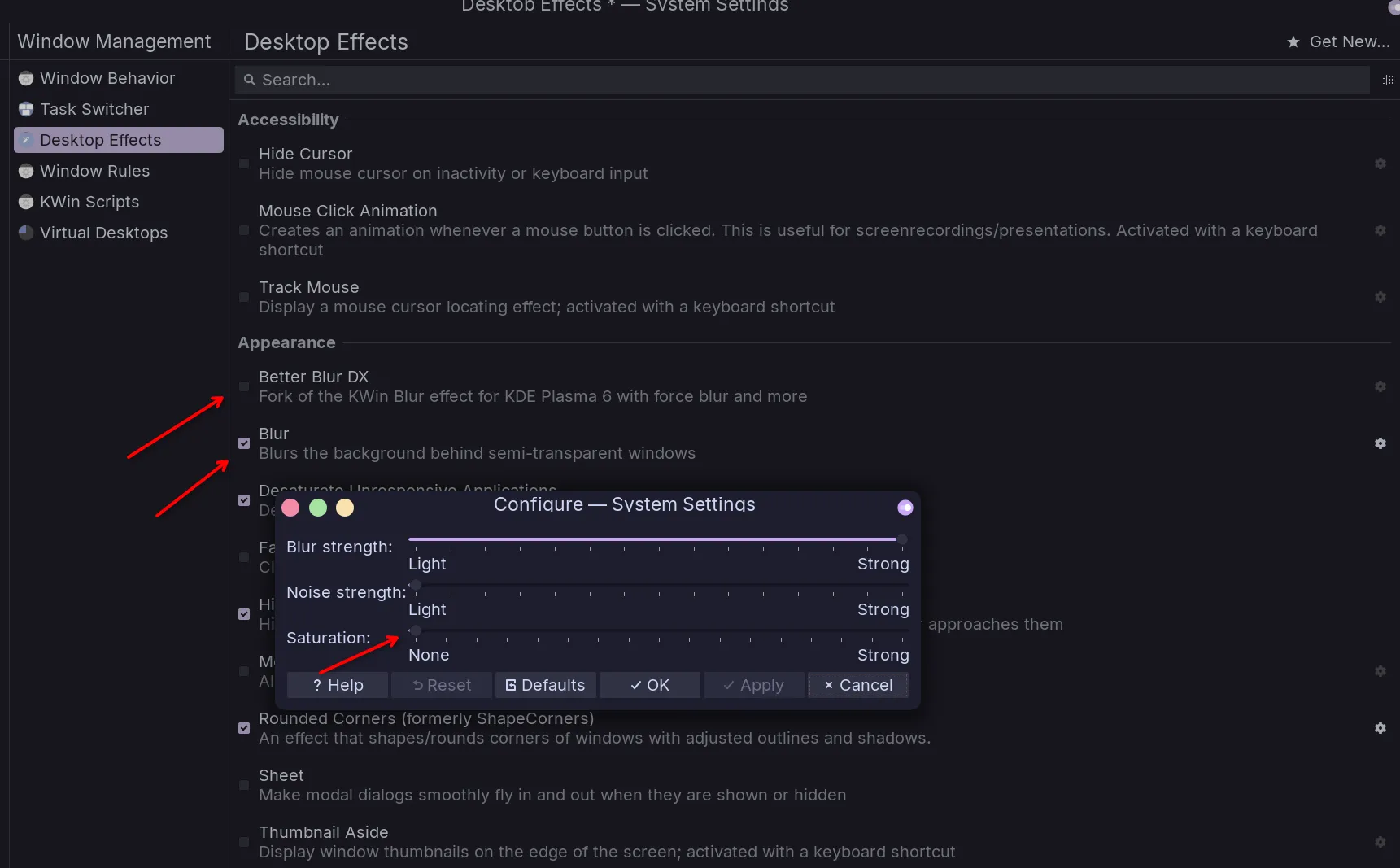
We moved away from Desktop Effects Better Blur DX and using the default Blur effect, you can toggle between them:

Desktop Effects with Blur enabled and its settings

Make sure to move all 3 sliders to the proper locations.

Moving away from SDDM to PLM (already happened) also made us ensure the Screen Locker was using the default wallpaper. If it does not for you, match the Greeter section from /etc/skel/.config/kscreenlockerrc to your personal ~/.config/kscreenlockerrc:

~/.config/kscreenlockerrc
[Greeter][Wallpaper][org.kde.image][General]
Image=file:///usr/share/wallpapers/garuda-mokka/City-horizon Mocha.jpg
PreviewImage=file:///usr/share/wallpapers/garuda-mokka/City-horizon Mocha.jpg

The biggest visual difference can be achieved by reproducing the [Round-Corners] section found in /etc/skel/.config/kwinrc. Simply copy the section over your [Round-Corners] section in your personal ~/.config/kwinrc.

Alternatively, here is the section:

~/.config/kwinrc
[Round-Corners]
ActiveOutlineAlpha=253
ActiveOutlinePalette=10
ActiveOutlineUseCustom=false
ActiveOutlineUsePalette=true
ActiveSecondOutlinePalette=10
ActiveSecondOutlineUseCustom=false
ActiveSecondOutlineUsePalette=true
InactiveOutlineAlpha=255
InactiveOutlinePalette=10
InactiveOutlineThickness=0.75
InactiveOutlineUseCustom=false
InactiveOutlineUsePalette=true
InactiveSecondOutlinePalette=10
InactiveSecondOutlineThickness=0.75
InactiveSecondOutlineUseCustom=false
InactiveSecondOutlineUsePalette=true
InactiveCornerRadius=20
InactiveShadowSize=25
OutlineThickness=0.75
SecondOutlineThickness=0.75
Size=20
UseNativeDecorationShadows=false